

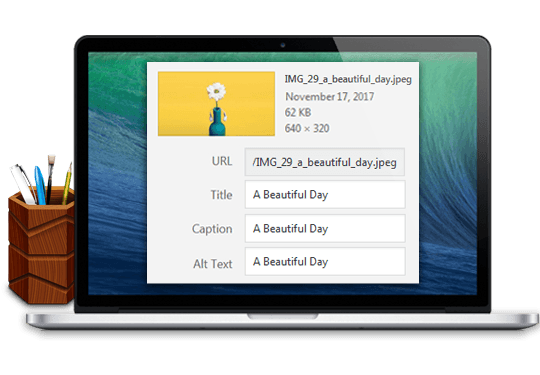
Image Attributes Pro WordPress Plugin is the best Auto Image Attributes From Filename With Bulk Updater Plugin. Best All-in-One Image SEO Plugin for WordPress. Hy friends, today I will share the best WordPress image SEO plugin. The Plugin will help optimize your newly uploaded and already uploaded images for search engines, helping them rank your Images in image searches on platforms like Google, Bing, Yandex, and so on. So, if you are a webmaster like me and want a plugin that helps add auto image titles, descriptions, and captions, you need to download Auto Image Attributes From Filename With Bulk Updater. Also, check out the Onpage Content SEO Plugin, such as All in one Seo Pack Pro For WordPress.
- First, click the download button below, then visit the developer’s website.
- You can download the free version and use it.
- If you see the best results with the free version, don’t forget to buy Auto Image Attributes Pro. The pro version will boost your image SEO from lower to higher, as I mentioned above.

It has been the best plugin for three years, and I got awe-inspiring results in any search engine as image search. So, the setup is straightforward. You need to download the image SEO plugin from below, upload it, and activate it. After that, you will upload any image to your WordPress media section or to a post or page. Then, it will automatically add Image attributes such as Image Title, Image Caption, Description, and Alt Text from the Image Filename, or fetch these types from the Post or page title. This fantastic image SEO plugin can update image attributes for new and existing images in the media library.
As you or we know, Image alt text and titles are critical for image SEO and will help users discover your images (and thereby your website) in Google / Yahoo / Bing image search. So, Proper alt text also helps people who are blind or who have low vision understand your images, thereby improving the accessibility of your website. This will open up your website to a new segment of visitors and increase your traffic. Suppose you have no idea how the plugin works, then I can help you with how the plugin works with a simple example.
So, let’s assume if your image filename is My_image-name.jpg, your Image Title, Caption, Description, and Alt Text will be My image name. And if you have bought the pro version of this plugin, you can change how the alt, title, and caption get the information. So, the plugin settings and bulk updater are in WordPress Admin > Settings > Image Attributes. Here you can choose which attributes to update for NEW uploads. Please remember that before using the plugin, you should take a database backup before running the bulk updater. The bulk updater updates ALL attributes for existing images in the Media Library and ignores the settings set for NEW uploads. So, do you need this plugin for your websites? Then, follow the link below and download it.


With this plugin, you can:
- Automatic Image Tagging: Generates descriptive tags for images using AI analysis.
- EXIF/Metadata Extraction: Reads and displays all embedded metadata from image files.
- AI-Powered Object Recognition: Identifies objects, people, and landmarks within images.
- Color Palette Detection: Extracts dominant colors and automatically generates color codes.
- Smart Keyword Suggestions: Provides SEO-friendly keywords for image search optimization.
- Bulk Image Processing: Processes hundreds of images simultaneously without manual intervention.
- Face Detection & Recognition: Detects faces and matches them against known datasets.
- Scene Classification: Categorizes images by context, such as nature, urban, or indoor.
- Automatic Caption Generation: Generates concise, human-readable image captions.
- Image Quality Analysis: Flags low-resolution or blurry images for review.
- Duplicate Detection: Identifies identical or near-duplicate images in datasets.
- Watermark Detection: Recognizes and reports existing watermarks in images.
- Geotag Mapping: Converts GPS metadata into readable location information.
- File Format Conversion: Converts images between standard formats like JPG, PNG, and WebP.
- Custom Attribute Templates: Allows users to define personalized image attributes.
- Cloud Storage Integration: Supports Google Drive, Dropbox, and AWS S3 for image storage.
- API Access for Developers: Enables programmatic retrieval and management of image attributes.
- Batch Caption Export: Exports generated captions and attributes into CSV or JSON.
- AI-Powered Color Correction: Suggests optimal adjustments for visual enhancement.
- Privacy Mode: Redacts sensitive metadata, such as location or personal identifiers.
- Version Control: Tracks changes to image attributes over multiple revisions.
- Multi-Language Support: Generates tags, captions, and keywords in several languages.
- Smart Search & Filtering: Finds images based on tags, colors, or detected objects.
- Adaptive Learning Engine: Improves tagging accuracy based on user feedback.
- Integration with CMS Platforms: Supports WordPress, Shopify, and other content systems.
- Customizable Reporting: Generates detailed reports of processed images and attributes.
- Real-Time Attribute Suggestions: Updates tags and captions as images are uploaded.
- AI Style Recognition: Detects artistic styles, genres, or trends in images.
- OCR Text Extraction: Reads embedded text from images for indexing and analysis.
- Cross-Device Synchronization: Keeps attributes consistent across multiple devices.
What pro-add-on do you get? These additional features:
- Use the post title as the title text. If an image is not attached to a post, the image filename will be used instead.
- Use the post title as alt text. If an image is not attached to a post, the image filename will be used instead.
- Use the post title as a caption. If an image is not attached to a post, the image filename will be used instead.
- Use the post title as a description. If an image is not attached to a post, the image filename will be used instead.
- Build your attributes using custom tags like
%filename%,%posttitle%,%sitetitle%,%yoastfocuskw%,%rankmathfocuskw%. Each custom tag will be replaced with its value. You can combine them as you please! - Use Yoast Focus Keyword and Rank Math Focus Keyword as image attributes.
- Clear any image attribute by setting it to an empty value.
- Exclude images from Bulk Updater. A meta box and a checkbox are added to the
Media Library>Edit MediaSidebar. When checked, the bulk updater will not update the attributes of that image in the media library or in posts/products where the image is used. - Remove apostrophe ( ‘ ) from the filename
- Remove the tilde ( ~ ) from the filename
- Remove plus ( + ) from filename
- Remove pound ( # ) from the filename
- Remove ampersand ( & ) from the filename
- Remove round brackets ( ( ) ) from the filename
- Remove square brackets ( [ ] ) from the filename
- Remove curly brackets ( { } ) from filename
- Filter words or characters from the filename
- Filter filename with regex
- convert image attributes to lowercase
- CONVERT IMAGE ATTRIBUTES TO UPPERCASE
- Use title casing for image attributes—The First Letter Of Each Word Will Be Capitalized.
- Use sentence casing for image attributes. The first letter of a sentence will be capitalized.
- Clean the actual image file name after upload.
- Choose to turn off any of the features mentioned above.
With the pro bulk updater, you can:
- Update image title and alt text for images inserted into posts and custom post types. Not just the media library.
- Fine-tune all settings. Choose what to update.
- Update image titles/alt text in the media library only. Image titles/alt text in existing posts will be left unchanged.
- Update image titles/alt text in the media library and existing posts.
- Update image titles/alt text in the media library and existing posts only if no title/alt text is set. Existing image titles/alt text will not be changed.
- Update image caption and description in the media library. Existing image captions and descriptions can be preserved.
- Build your attributes using custom tags like
%filename%,%posttitle%,%sitetitle%,%yoastfocuskw%,%rankmathfocuskw%. Each custom tag will be replaced with its value. You can combine them as you please! - Choose to turn off any of the features mentioned above.
- Modify auto-generated image attributes using the iaffpro_image_attributes filter.
- Choose specific post types to bulk update using the iaffpro_included_post_types filter.
- Disable updating of attributes in the media library completely using the iaffpro_update_media_library filter.
- Add or remove custom image attributes using the iaffpro_html_image_markup_post_update filter.
| Attribute | Details |
|---|---|
| Name | Auto Image Attributes Pro |
| File Name | auto-image-attributes-pro.zip |
| File Size | 5 MB |
| Version | 6.0 |
| License Type | Commercial / Premium |
| Released Date | 2023-05-10 |
| Created By | Massive Dynamic |
| Publisher | Massive Dynamic |
| Developer | Massive Dynamic Team |
| Category | WordPress Plugin / SEO Tools |
| Language | English |
| Uploaded By | Massive Dynamic |
| Official Website of the Developers | Visit Website |
| Compressed Type | ZIP |
| Compatibility | WordPress 5.0 and above |
| Specification | Requirement |
|---|---|
| OS | Any OS supporting WordPress (Windows, macOS, Linux) |
| Processor | 1 GHz or faster |
| RAM | 2 GB minimum, 4 GB recommended |
| Graphics Card | Not required |
| DirectX | Not applicable |
| Storage | 50 MB for plugin files + WordPress installation space |
| Input Device | Keyboard and Mouse |
| Permissions | Administrator access to WordPress site |
| Display Resolution | 1024×768 minimum |
| Internet Connection | Required for plugin activation and updates |
| Mouse | Standard pointing device |
| Keyboard | Standard keyboard |